Stickers and Emoji - WASticker
- 0.0
- Rating
- 500.00K
- Installs
- Free
- Price
 Analysis by App-foxy
I tried Stickers and Emoji - WASticker as a lightweight way to make custom smiley faces and cute emoji stickers, and my first impression was clear: this is aimed at people who want visual replies quickly rather than a full drawing studio. It sits in the Comics category, comes from Lambent Labs, and is free to install, which makes it easy to test without committing money at the start. The app is rated for Everyone, so its basic concept is approachable for a wide audience.
The useful question, though, is not simply whether it can make stickers. Many apps can do that. The better question is whether this particular tool fits the way you communicate. In my experience, it works best when I want a small collection of expressive images for everyday chats: a cheerful reaction, a playful apology, a quick celebration, or a message that feels warmer than plain text. It is less convincing for anyone expecting professional illustration tools, deep editing controls, or a carefully managed design library.
What using it feels like in everyday conversations
The most natural workflow is to treat the app as a reaction builder. Instead of searching through a huge sticker catalog, I can start with an emoji-like face or an emoticon idea and turn that mood into something more personal. That distinction matters. A standard emoji is familiar but limited, while a custom sticker can carry a slightly different expression that matches an inside joke or the tone of a particular conversation.
You May Also Like

 Blood Strike: 2.5 Anniversary
Blood Strike’s Loadouts Turn Every Drop Into a Tactical Gamble
A close look at Blood Strike’s custom loadouts: how fast access to signature weapons reshapes its battle royale rhythm, rewards preparation, and narrows the gap between fights.

 Pandora - Music & Podcasts
Pandora’s Music Is Easy to Start, but Harder to Recover
Pandora’s strength is its low-effort path from a seed to a station. Its weak spot is how much confidence it asks you to place in connection, setup, and quiet recovery.

 8 Ball Pool
 Is Built on Rivalries, Rematches, and Routine
A close look at the rivalries, rematches, shared routines, and unanswered safety questions that turn a quick pool match into a persistent mobile community.

 Samsung Music
’s Quiet Strength Is Playing What You Already Own
Its reach comes less from spectacle than from dependable access to a personal library. That simplicity is both the app’s strongest retention engine and its ceiling.

 AccuWeather: Weather Radar
AccuWeather Review: A Quick, Clear Forecast for Everyday Decisions
For everyday plans, the best forecast is the one you can understand quickly. AccuWeather makes rain timing, radar, and local conditions easy to act on, with a few trade-offs.

 Hill Climb Racing
Why Hill Climb Racing Still Turns Crashes Into One More Run
A tiny car, a bumpy hill and one more upgrade: Hill Climb Racing keeps resurfacing because its simple chaos makes every near-miss feel personal.
More From Our News Desk



A realistic example is a family group chat planning a birthday. I might create a bright, exaggerated smiley for the first congratulations, then use a softer cute sticker when thanking everyone for helping. The value is not that the app replaces written messages; it gives short replies a recognizable visual voice. For friends who already communicate with reactions, that can make the app feel immediately useful.
I also found that custom stickers are more practical when I make them around situations I actually repeat. A small set for “on my way,” “well done,” “sorry,” “thank you,” and “good night” is more useful than producing dozens of random faces. This is one of the less obvious strengths of the concept: the app encourages a personal reaction vocabulary instead of another enormous collection that becomes difficult to browse.
That said, the experience depends heavily on how much control the editor gives me at each step. A quick emoji maker should not force me through a long design process for every small reaction. If I want to spend several minutes refining a character, I would rather use a drawing or image-editing app. Here, the appeal is speed and friendliness, not precision. I would approach it with that expectation from the beginning.
A good fit for simple, personal sticker sets
I would recommend it first to casual chat users, younger users who enjoy expressive faces, and anyone who wants to turn familiar emoticons into something more distinctive. It can also suit a person who does not want to learn layers, brushes, masks, or complicated export settings. The store summary focuses on making custom emoji smiley faces and cute stickers through emoticons, and that focus comes through in the way I think about its best use.
The app is also a reasonable choice for someone who wants to experiment before paying for a specialized creative tool. Its free entry point removes the biggest barrier to trying a new sticker maker. However, optional purchases are listed at $5.49 per item, so I would pay attention before confirming anything inside the app. Free installation does not automatically mean every creative element or convenience is free.
For a child using it, the Everyone rating makes the subject matter feel accessible, but I would still keep normal device supervision in place. Age ratings describe the intended content level, not every possible situation involving purchases, sharing, or device use. If the app is being used on a family phone or tablet, checking purchase controls at the operating-system level is a sensible precaution.
Where it differs from ordinary emoji keyboards
A normal emoji keyboard is faster for a one-off reaction. I can open it, choose a symbol, and continue typing without creating anything. Sticker packs offer another advantage: they usually provide a consistent visual style immediately. This app becomes more appealing when those ready-made choices do not quite match what I want and I would rather make a face that feels personal.
The trade-off is preparation. A custom sticker takes more effort than tapping a standard emoji, and a growing collection can become harder to manage than a familiar keyboard. I would not install this expecting it to replace every emoji or sticker source. I see it as a companion for moments when a generic symbol feels too plain.
Compared with a full image editor, the advantage is approachability. A dedicated editor may offer better control over typography, backgrounds, cropping, and visual consistency, but it also asks more from the user. If my goal is a polished sticker series for a community, business, or public channel, I would choose the more advanced option. If my goal is a cute reaction for a private conversation, the simpler route makes more sense.
Trust, controls, and moments that deserve attention
Trust is important with any app that helps create content for communication, especially when the result may be shared with friends or family. In reviewing this one, I would separate what I can visibly control from assumptions about what happens behind the scenes. The app is made by Lambent Labs, has passed the half-million-install mark, and its current version is 2.79. Those details show that it is not an obscure one-day experiment, but popularity alone is not proof of a particular privacy practice.
I would therefore make my decision based on the screens and choices presented during use. Before creating or sharing anything, I would read any permission request carefully, check whether access is optional, and ask whether the requested access makes sense for the action I am taking. I would not grant broad access automatically just because the app is free or because the feature looks convenient.
The most data-sensitive moment is usually not the creation of a simple face; it is importing, saving, or sharing material. If I choose an image from my device, I would select only the specific item needed rather than treating the app as if it should see my entire collection. If a system picker offers a limited selection, that is the choice I would prefer. It keeps the workflow focused and gives me more control over what enters the process.
Sharing deserves the same care. A sticker can look harmless, but a custom image may contain a person’s face, a private joke, a child’s likeness, or details from a screenshot. I would review the finished image before sending it, particularly if I built it from personal material. The app can help with expression, but I remain responsible for deciding who should receive the result.
I also would not assume that deleting a sticker from a visible collection answers every question about copies, exports, or messages already sent. Once an image has been shared, other people may retain it. That is not a criticism unique to this app; it is a practical reason to avoid placing sensitive information into casual sticker designs.
How I would keep control during setup and use
My preferred setup is deliberately cautious. I would install the app, note which functions work without extra access, and grant only what is needed for a specific task. If a permission can be denied without blocking the editor, I would leave it denied until I understand the benefit. This approach is especially useful for a simple emoji maker because the creative goal is narrow; there is no reason to approve every request without reading it.
I would also watch the purchase flow. The app is free, but in-app items cost $5.49 each. I would avoid tapping through a purchase screen quickly, confirm the item and account being charged, and use device purchase authentication if the phone is shared. This is one of the most important practical tips for families: the Everyone rating does not remove the need to protect payment controls.
Account control is another point I would check directly in the app. If an account, sign-in, backup, or sharing option appears, I would read the available choices instead of enabling everything for convenience. I would favor local, limited workflows when they are offered and avoid connecting a service unless I understand why it is necessary. Since trust depends on visible choices, this is the right place for the user to slow down.
I would apply the same caution to updates. The minimum operating-system requirement is Android 7.0, which makes the app accessible to a broad range of older Android devices. That compatibility is useful, but older phones may have different privacy controls and security support than newer models. Keeping the device itself updated where possible is just as important as keeping the app current.
Small workflows that make the app more useful
My first practical tip is to design by emotion rather than by decoration. Before opening the editor, I would decide whether I need a warm thank-you, a sarcastic reaction, a celebration, or a calm acknowledgement. Choosing the emotional job first prevents a common problem with sticker makers: spending time making attractive images that I never actually use.
My second tip is to build a consistent mini-set. I would reuse a similar face shape, expression style, or wording across several stickers. Even without advanced design tools, consistency makes the set easier to recognize in a busy chat. It also reduces the time needed to decide which sticker to send, because each image has a clear purpose.
My third tip is to test readability at small size. A face that looks expressive while editing may lose its expression when reduced in a conversation. I would keep the main eyes, mouth, and any short text visually simple. If a sticker needs a long explanation, it is probably doing too much and would be better as a normal message with a small emoji.
A fourth useful habit is to separate private humor from broadly shareable designs. I might create one set for close friends and another with neutral reactions suitable for family or mixed groups. This avoids the awkward situation where a sticker made for one inside joke is accidentally used in the wrong chat. The app’s creative flexibility is most helpful when I organize the results around real communication contexts.
Limitations I would consider before installing
The main limitation is that a focused emoji maker may feel narrow after the novelty wears off. If I rarely use stickers, a regular emoji keyboard may already solve the problem with less effort. The app earns its place when I enjoy customizing reactions or want a more personal visual style, not simply because it can produce another smiley face.
There is also a possible maintenance burden. A personal sticker collection can become cluttered, and the more designs I create, the more time I spend choosing between them. I would resist making a new sticker for every mood. A smaller set with clear purposes is easier to use and reduces the chance that the app becomes a storage drawer for forgotten experiments.
Users looking for professional output should be realistic about the category. This is a Comics app centered on cute emoji-style expression, not a substitute for illustration software, brand design tools, or a serious photo editor. For professional work, I would want explicit control over resolution, typography, file handling, and repeatable visual standards. When those details matter, a specialized creative application is the better choice.
I would also be careful about treating the install count as a quality guarantee. More than 500K installs indicates meaningful interest, but it does not tell me whether the editing approach will suit my habits or whether every optional feature is worth its cost. I would judge the app by the actual creation flow, the clarity of its choices, and how comfortable I feel managing the finished stickers.
Who should use it, and who should skip it
I think it is a good match for someone who wants cute, personal chat reactions without learning a complicated editor. It is especially suitable for small private sticker sets, playful family conversations, and users who enjoy turning emoticons into a recognizable style. The free starting point makes experimentation easy, provided I remain attentive to optional purchases and the permissions shown on my device.
I would skip it if my priority is the absolute fastest way to reply, because a standard emoji keyboard is more immediate. I would also skip it for serious artwork, commercial sticker production, or detailed image manipulation. In those cases, the convenience of a focused maker would not compensate for the control I would expect from a more advanced tool.
For privacy-conscious users, my advice is neither an automatic endorsement nor an automatic warning. I would install only if the visible permission and sharing choices feel proportionate to the task, and I would keep personal source images out unless they are genuinely appropriate to use. The strongest trust signal here is not a marketing promise; it is whether the app lets me make sensible choices without pressure or confusion.
My considered recommendation
After using it as a custom reaction tool, I see Stickers and Emoji - WASticker as a friendly, narrowly focused option rather than an all-purpose graphics app. Its best quality is the way it turns ordinary emoji-style communication into something more personal. I can imagine keeping a small, useful set for recurring conversations and enjoying the process without needing design experience.
The caveat is equally straightforward: the app is worthwhile only if I will actually use custom stickers. I would keep the collection compact, check every permission request, review sharing choices, and treat the $5.49 in-app items as optional purchases that deserve a deliberate decision. Those habits make the experience more comfortable and prevent a simple creative tool from becoming unnecessarily intrusive or expensive.
My final view is cautiously positive. For casual Android users on version 7.0 or later who want cute custom reactions, this app is easy to justify trying. For people who need professional editing, instant replies, or a highly controlled privacy workflow beyond what is visibly offered, another category of app may be a better fit. I would recommend it to a friend with that distinction clearly stated: use it for personal expression, keep control of your content and purchases, and do not expect it to be more than the focused sticker maker it sets out to be.
FAQs for Stickers and Emoji - WASticker
01What is Stickers and Emoji - WASticker and how does it work?
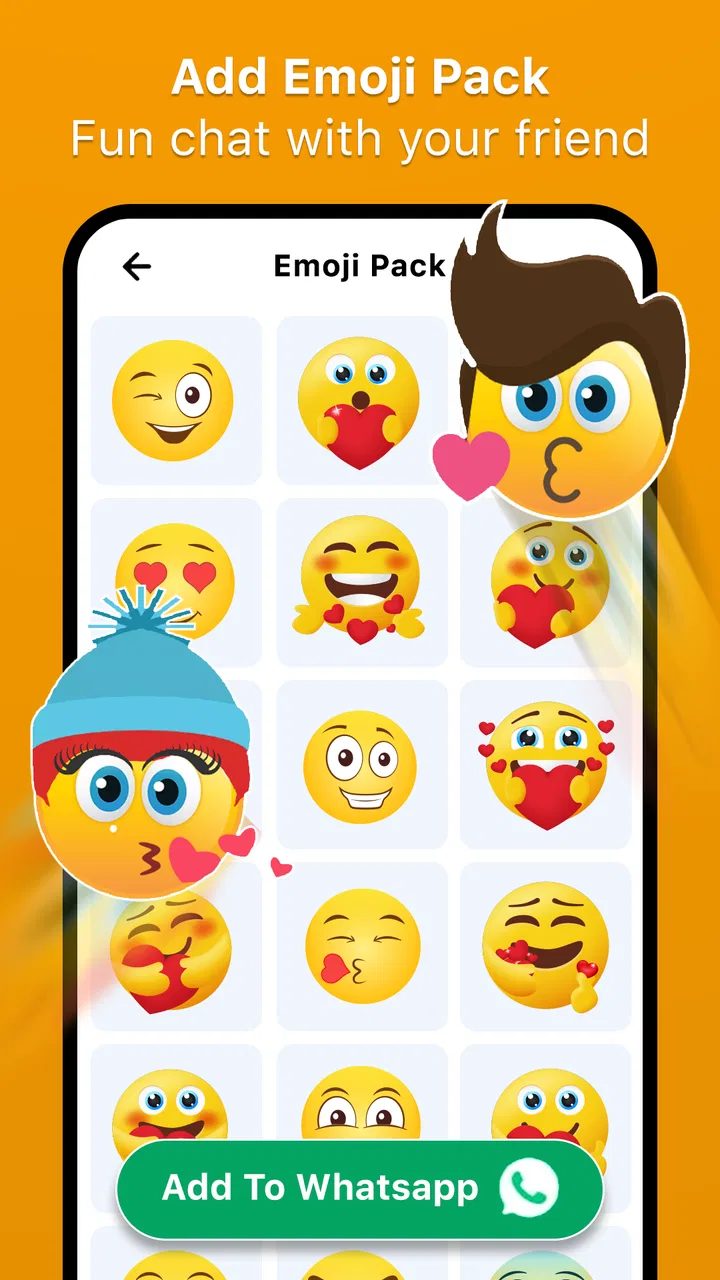
Stickers and Emoji - WASticker is an app designed to enhance your messaging experience by providing a vast collection of stickers and emojis. Once downloaded, you can integrate these stickers directly into your chat applications like WhatsApp. The app allows you to easily browse, select, and send stickers and emojis to your contacts, making your conversations more expressive and fun.
02Is Stickers and Emoji - WASticker free to use?
The app is free to download, but it may offer in-app purchases or premium sticker packs. These purchases are optional and provide access to additional features or exclusive content. Always check the app’s store listing for details on pricing and available features to ensure it meets your needs before downloading.
03Can I create my own stickers in Stickers and Emoji - WASticker?
Stickers and Emoji - WASticker may offer a feature that allows users to create custom stickers. This feature typically includes options to add text, images, or drawings to your creations. Be sure to explore the app’s interface and settings to see if this option is available, as it can enhance personalization in your messages.
04Is Stickers and Emoji - WASticker compatible with all messaging apps?
The app is primarily designed for integration with popular messaging apps like WhatsApp. However, compatibility with other messaging platforms may vary. It’s important to verify in the app description or settings if your preferred messaging app is supported to ensure seamless use of the stickers and emojis.
05How often is new content added to Stickers and Emoji - WASticker?
The frequency of new sticker and emoji updates can vary. Some apps regularly add new content to keep the experience fresh and engaging. You should check the app’s update notes or follow its social media channels for announcements about new releases to stay informed about the latest additions.
Pros
- Extensive variety of stickers available.
- Easy integration with messaging apps.
- Regular updates with new content.
- User-friendly interface and navigation.
- Low storage usage on devices.
Cons
- Some stickers require in-app purchases.
- Limited customization options.
- Ads can be intrusive at times.
- Compatibility issues on older devices.
- No option for creating custom stickers.

Stickers and Emoji - WASticker
Gallery